

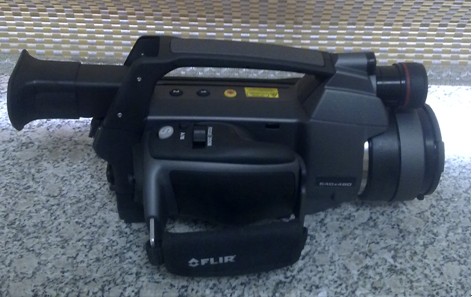
Thermal Infrared Imager
Name: Thermal Infrared Imager
Manufacturer: FLIR Company
Equipment model: SC620
Main Specifications: Infrared
Field angle / minimum focus distance: 24 ° x 18 ° / 0.3m (standard lens)
Spatial resolution (IFOV): 0.65mrad (standard lens)
Thermal sensitivity <0.065 ° C (at + 30 ° C)
Digital zoom: 1 to 2 times continuously, including the area zoom function
Wavelength range: 7.5 ~ 13μm
Measurement
Temperature range: -40 ° C ~ 1500 ° C (option)
Accuracy (% of reading) ± 2 ° C or ± 2% of reading
Image Storage
Type: removable SD card (1GB)
Panorama mode: assisting to shoot several continuous scenes of infrared image, providing seamless splice.
Window mode: 640x240 / 640x120
Image storage mode: single image; infrared and visible images can be stored simultaneously
Environmental parameters:
Operating temperature -15 ° C ~ + 50 °C
Storage temperature -40 ° C ~ + 70 ° C
Humidity 10% ~ 95%, IEC 68-2-30
Main application areas: target monitoring, fire monitoring, identification of camouflaged and concealed targets at night and in adverse weather conditions
Main function:
Excellent sensitivity and a more advanced function set. It can be used to shoot high-resolution infrared and visual images, with accurate temperature measurement, voice annotation and a host of other advanced features.
Related Links:
FLIR company:
http://www.flir.com
Person in charge of the equipment: Xue Wenying
Location: Room 104, RAL
Ways of contact:
Tel: 83686420
E-mail:
Operation Rules
Ⅰ. Function of keys and operations
1) Pressing ‘A’ key for two seconds, you can switch among three operating modes: manual, automatic operation 1 and 2. The main function is to adjust the screen effect of the heat map (brightness and color), having no effect on the temperature.
2) The key ‘C’ is to cancel—cancel key.
3) S is the freeze key. If you want to store, press the S button again. Namely, ‘S + S’ stands for storage after freeze. If you need a voice recording scene, namely to make the thermal image with a voice recording, press the S key to freeze the heat map, and then vertically press the navigation key to bring up the menu bar to record.
4) Navigation key functions: toggling left/right means to zoom in and out; up and down toggling means the adjustment of focal length (heat map definition); vertically pressing means to bring out the needed program; vertically pressing again after completing the settings means to determine the modifications of the program.
5) Functions of four shortcut buttons are as follows: F1, the power saving mode; F2, PIP (infrared and visible light are shown at the same time); F3, laser calling key; F4, a key to auto-focus;
6) If the temperature of a heat map is distorted, firstly check whether the proper temperature gear was selected. Generally, F1 gear is often selected during electric power measuring temperature,(F3 is selected when it comes to telephoto lens);F1 gear applies to measure temperature between -20~250℃,and F2 gear measures temperature between 100~800℃. With an improper gear, the measured temperature may be inaccurate.
7) While shooting the heat map, it must be made clearly, so as to ensure an accurate temperature measurement.
Ⅱ. Operation Procedures
- Press ‘POWER’ to start the machine.
- Wait for half a minute after powering on, so the equipment can be stable; then remove the IR lens cap (ensure the correct gear has been chosen); focus on the object to be shot, and adjust the focus length; press S to freeze when it comes to be stable.
- Press S again to save it after completing the record. If record is required, press the record key in accordance with the boot prompt of the machine.
- After saving the record, press C key to exit.
- Power off, and store the equipment into the toolbox.