

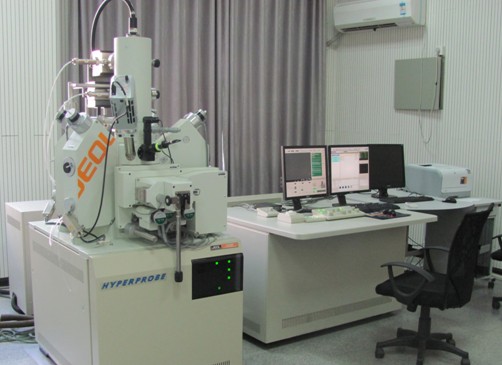
Electron probe
Name: Field Emission Electron Probe
Model: JEOL JXA-8530F
Manufacturer: JEOL, Ltd.
Purchasing date: December 25, 2009
Main Specifications:
1) spatial resolution: better than 0.1μm;
2) Image magnification: 40 times to 30O thousand times;
3) Analytical element: 5B - 92U;
4) Accelerating voltage: 0 ~ 30kV
Common accessories: Four-lane spectrometers and energy dispersive spectroscopy
Main application areas: metallic and non-metallic materials
Main functions: the composition and morphology analysis of material micro-cell
Person in charge of the equipment: Wu Hongyan
Ways of contact:
Tel:024-83690365
E-mail:
Location: Room 107, RAL
JEOL JXA8530 F field emission electron probe – Operating procedures
- Starting up
- Check and make sure the following conditions: the room temperature (<21 ℃), cooling circulating water temperature (<20 ℃), humidity (<40%).
- Confirm nitrogen pressure is 0.4-0.5MPa, PR (Ar10% -CH490%), and gas pressure is 0.05MPa
- Check whether the host power button MAIN POWER, Vacuum POWER button and OPE POWER button are "ON" (normal state).
- Open software JEOL-EPMA (electronic probe operating procedures).
- Confirm the following information in the window of Maintenance:-GUN / VAC : SIP1 vacuum degree is on 10-8Pa level, SIP2 vacuum degree is on 10-6-10-7Pa level, Gun Chamber is in "Ready" state, and SPE (sample chamber) “vacuum” is displayed as "READY "state.
- II. Sample placing and removal
- Sampling: confirm “Observation” is “OFF”, PCD is “OFF”, and the sample table is put on Exchange Position (“Exchange Position” light turns green). Lift the pull rod to horizontal position, slowly send it to the chamber bottom , rotate to the left, and then pull out the pull rod. Press ”VENT” and send atmosphere to sample chamber.Till the "VENT” light doesn’t flash, open the chamber, take out sample table and install the sample.
- Sample loading: place the sample table loaded with sample correctly on the sample table rack, and seal the sample chamber. Press ”EVAV’, and when the light doesn’t flash, send the rod to the bottom of chamber. The steps are as follows: send the rod to innermost part; rotate to right; pull it out—finish placing sample, and then place the rod vertical to the ground.
- Select relevant sample table according to software tips and click HOME POSITION to move the sample table to default position.
III. Image Collection
- Click "Observation ON” (open V1 valve), and open PCD.
- Move the sample to an appropriate position. Adjust the optical microscope OM to the focus, WDS working distance to 11mm, and appropriate magnification. Then, began to focus on and eliminate astigmatism.
- Capture images and perform qualitative or quantitative analysis.
IV. Completion of the experiment
- Transfer the magnification back to 40 ×, and place the sample stage to exchange position( Click Exchange Position).
- Click Observation OFF (close V1 valve), and close PCD. Take out the sample according to steps of ” Sample taking” above.
- Exit JEOL-EPMA software, then turn off the LCD monitor.
RAL 2011